
유튜브 쇼츠 다운로드 방법
세 단계면 끝, 프로그램도 계정도 필요 없습니다. 휴대폰과 PC 모두 지원합니다.
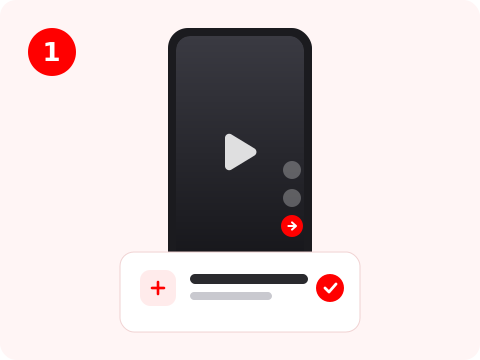
쇼츠 링크 복사
유튜브 앱에서 쇼츠 아래의 공유를 누르고 링크 복사를 선택하세요. PC에서는 재생 중에 주소창의 URL을 복사하면 됩니다.
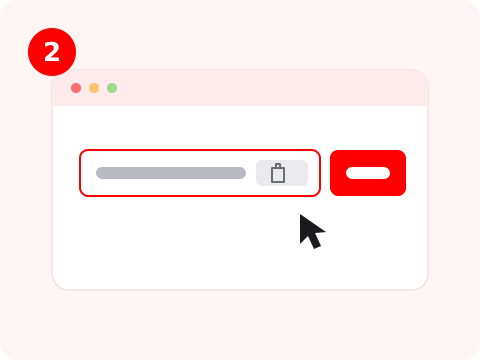
위 입력창에 붙여넣기
링크를 이 페이지의 입력창에 붙여넣고 다운로드를 누르세요. ShortsDL이 쇼츠를 읽어 썸네일, 제목, 사용 가능한 최고 화질을 보여줍니다.
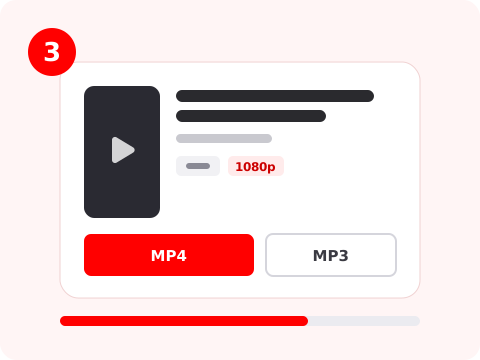
MP4 또는 MP3 선택
유튜브가 제공하는 최고 화질 영상은 MP4 다운로드를, 오디오만 필요하면 MP3 다운로드를 누르세요. 파일은 브라우저에서 생성되어 기기에 저장됩니다.
Why Choose ShortsDL
A YouTube Shorts downloader that actually returns HD video with sound.
Real HD, up to 1080p
Most free tools quietly hand you a 360p file. ShortsDL grabs the highest quality video stream YouTube publishes for the Short and pairs it with the full-quality audio track.
Video and audio, joined properly
The two streams are merged in your browser with a stream copy, so there is no re-encoding, no quality loss and no silent video.
No watermark, ever
The file you get is the original YouTube MP4. Nothing is overlaid, stamped, cropped or branded on top of the creator's video.
MP3 audio in one click
Extract the soundtrack of any Short as a 192 kbps MP3 without hunting for a separate converter site.
Nothing is stored on our servers
Your Short is assembled on your own device. We never keep a copy of the video, the audio or the links you paste.
Free, unlimited, no login
No account, no subscription, no daily cap and no app to install. Paste a link and download as often as you like.
블로그 최신 글
How to Download YouTube Shorts in HD on Any Device
Step-by-step guide to downloading YouTube Shorts as MP4 or MP3 with ShortsDL, on iPhone, Android, Mac and Windows. No app, no login, no watermark.
How to Copy a YouTube Shorts Link (Phone and Desktop)
Every way to copy the link to a YouTube Short — the app Share menu, the address bar, the channel's Shorts tab — and which URL formats a downloader accepts.
How to Download YouTube Shorts on iPhone (No App Needed)
Save YouTube Shorts to your iPhone with Safari — where the file goes, how to move it into Photos, and how to get the audio as MP3. No app, no shortcut, no login.
Built for Shorts
What makes ShortsDL different from a generic video downloader
Vertical-first
Shorts are short and vertical, so the whole flow is tuned for them: one tap to the best quality, no resolution menu to wade through, and merging that finishes in seconds.
Fast by design
The converter loads once in the background while you look at the result card, then stays ready. Later downloads skip straight to fetching the streams.
Private by design
Merging and MP3 conversion run entirely in your browser with WebAssembly. The finished file never travels back to us.
YouTube Shorts Downloader: Save Shorts in HD, Free
ShortsDL turns any public YouTube Short into a file you can keep. Paste the link, press Download, and the clip is saved to your phone or computer as a clean MP4 — no app to install, no account, no watermark stamped over the video.
YouTube stores the picture and the sound of a Short as two separate streams. ShortsDL fetches both and joins them back together inside your browser, so you get a single 1080p file with audio instead of the silent video most downloaders hand you. The streams are copied, never re-encoded, so nothing is lost along the way.
Because the joining happens on your own device, the Short is never stored on our servers. We resolve the link, pass the streams through, and the finished file is assembled locally and handed straight to your browser's downloads.
Need only the audio? Download MP3 pulls the soundtrack out of the Short and encodes it at 192 kbps — handy for saving a song, a sound effect, or a spoken clip. ShortsDL works in any modern browser on iPhone, Android, Windows, macOS and Linux.
Frequently Asked Questions
Common questions about downloading YouTube Shorts
Important Notice
ShortsDL is a free tool intended for personal use only. All Shorts belong to their original creators. Please respect copyright and only download content for personal, educational or reference purposes. Do not use downloaded content commercially or redistribute it without permission. We do not store any videos or audio on our servers. Learn more about our DMCA Policy and Copyright Notice.